MetaDesign Solutions
In 2026, children are growing up in a hyper-connected world. From social media platforms and gaming communities to AI chatbots and streaming apps, digital exposure begins earlier than ever. Parents are increasingly looking for secure, intelligent, and privacy-focused solutions to monitor and guide their children’s online activities.
This demand has fueled the rise of parental control app development.
However, building a parental monitoring application today requires more than just content blocking. It demands secure architecture, AI-driven insights, compliance with data privacy laws, and cross-platform scalability.
This guide explores how to build a secure parental control app in 2026, covering technology stack, security measures, compliance, and must-have features.
Why Security Is the Foundation of a Parental Control App
A parental control application handles highly sensitive data, including:
- Location tracking
- Browsing history
- App usage data
- Call logs and messages (where legally allowed)
- Device activity patterns
Without strong security measures, such apps can become privacy risks.
Secure parental control app development must prioritize:
- End-to-end encryption
- Secure cloud storage
- Role-based authentication
- Data minimization practices
- Regulatory compliance
Trust is the most critical success factor in this category.
Step 1: Define Core Features
Before designing the architecture, identify essential features.
1. App & Website Blocking
Allow parents to restrict access to inappropriate apps and websites using category-based filtering and AI-based content detection.
2. Screen Time Management
Enable customizable screen time limits and automated device lock scheduling.
3. Real-Time Location Tracking
Provide GPS-based live tracking with geofencing alerts.
4. Activity Monitoring
Track app usage, browsing history, and device activity trends.
5. AI-Powered Risk Detection
Use AI models to detect harmful content, cyberbullying patterns, or unsafe conversations.
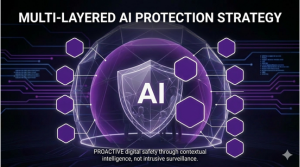
Modern parental control apps increasingly rely on AI-based behavior analysis to proactively alert parents.
Step 2: Choose the Right Technology Stack
Building a scalable parental monitoring solution requires a robust tech stack.
Frontend Development
- Flutter Development or React Native Development for cross-platform apps
- Native iOS (Swift) and Android (Kotlin) for deeper OS integration
Backend Development
- .NET, Node.js, or Golang for scalable API development
- RESTful APIs or GraphQL
- Microservices architecture
Database
- PostgreSQL or MongoDB
- Encrypted data storage
- Secure backup systems
Cloud Infrastructure
- AWS, Azure, or Google Cloud
- Kubernetes for container orchestration
- Auto-scaling architecture
This ensures cross-device compatibility and enterprise-grade reliability.
Step 3: Implement Advanced Security Architecture
Security should be built into the foundation.
End-to-End Encryption
All communication between child devices, parent dashboards, and servers must be encrypted using TLS and encrypted storage protocols.
Multi-Factor Authentication (MFA)
Parents should access dashboards using secure authentication methods.
Secure APIs
Use OAuth 2.0 and JWT tokens for secure API authorization.
Role-Based Access Control
Ensure only authorized parents can access child device data.
Zero-Trust Architecture
Adopt zero-trust principles to prevent unauthorized access.
Security is not a feature — it is an infrastructure requirement.
Step 4: Ensure Legal and Regulatory Compliance
Parental control apps must comply with:
- COPPA (Children’s Online Privacy Protection Act)
- GDPR (for EU users)
- Local child data protection laws
- Platform-specific app store guidelines
Failure to comply can result in severe penalties and app removal.
Data transparency, parental consent verification, and minimal data retention are essential.
Step 5: Integrate AI for Smart Monitoring
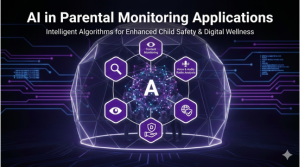
AI in parental control apps enhances detection and reduces manual oversight.
Use AI for:
- Content filtering
- Sentiment analysis in messages
- Cyberbullying detection
- Risk behavior prediction
- Screen addiction monitoring
Modern parental apps are shifting from passive monitoring to proactive alert systems powered by machine learning.

Power Your SaaS Platform with Custom QuickBooks Integration
Need seamless financial automation inside your SaaS product? Discover how custom QuickBooks integration can streamline billing, automate accounting workflows, and enhance real-time data synchronization.
Step 6: Cross-Platform Device Compatibility
A secure parental control app must support:
- Android smartphones
- iOS devices
- Tablets
- Windows PCs
- macOS systems
Android allows deeper device-level monitoring compared to iOS due to OS restrictions. Therefore, feature sets may differ slightly across platforms.
Cross-platform development frameworks combined with native modules provide balanced flexibility.
Step 7: Cloud-Native & Scalable Architecture
To handle large user bases, your parental control solution must be cloud-native.
Key requirements:
- Microservices architecture
- Auto-scaling servers
- Distributed logging
- Real-time analytics dashboards
- Secure API gateways
Cloud-native deployment ensures performance even during high concurrent usage.
Step 8: Privacy-First User Experience
Modern users are privacy-conscious.
Provide:
- Transparent data usage policies
- Configurable monitoring levels
- Clear consent mechanisms
- Secure data deletion options
Building a privacy-first parental monitoring platform increases adoption and trust.
Step 9: Monetization Model
Common revenue strategies include:
- Subscription-based pricing
- Tiered feature plans
- Enterprise school monitoring solutions
- Freemium with premium upgrades
Secure payment integration must follow PCI compliance standards.
Key Challenges in Parental Control App Development
Developers must address:
Operating system restrictions (especially iOS)
Privacy compliance complexities
High data security expectations
Balancing monitoring with ethical boundaries
Ensuring child-device performance optimization
A strong engineering approach reduces these risks.
The Future of Parental Control Apps in 2026
Emerging trends include:
AI-powered digital wellness coaching
Emotion detection systems
AI chatbot monitoring alerts
Cross-platform parental dashboards
Predictive risk analytics
Integration with wearable devices
Parental control apps are evolving into comprehensive digital safety platforms.
Final Thoughts
Building a secure parental control app in 2026 requires more than monitoring tools. It demands:
Enterprise-grade security
AI-driven automation
Cloud-native scalability
Regulatory compliance
Privacy-focused design
Parents demand transparency, reliability, and intelligent insights — not intrusive surveillance tools.
Organizations that prioritize secure architecture, AI-powered monitoring, and ethical data handling will lead the next generation of digital safety solutions.
Related Hashtags:
#ParentalControlApp #MobileAppDevelopment #AIDevelopment #DigitalSafety #ChildOnlineSafety #CyberSecurity #CloudNative #AppDevelopment#MetaDesignSolutions