


 MetaDesign Solutions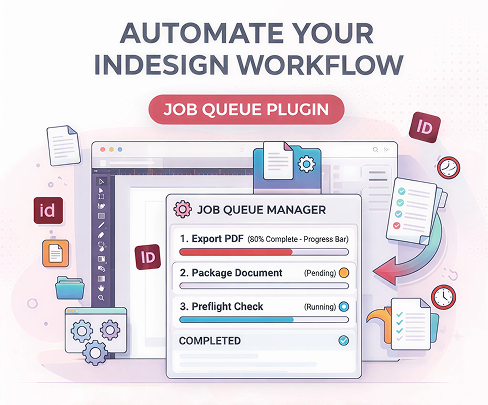

70%
Workflow Speedup

50k+
Daily Jobs Processed

95%
Manual Errors Reduced

12+
Plugin Engineers
Stop Making Designers Wait for PDF Exports PDF Exports
Our custom InDesign plugin development services turn InDesign Desktop into a remote control for your InDesign Server engine. Every resource-heavy task — high-resolution PDF generation, batch document processing, preflight checks — is pushed to a background InDesign Server job queue, so your designers never have to stop and wait.

Designers can submit layouts to the production queue directly from an integrated InDesign panel.

Track the status of every render job—"Pending," "Processing," or "Completed"—without leaving the app.

Move resource-heavy PDF generation to the server, allowing designers to continue working on new layouts.

Our plugins automatically collect, package, and sync all fonts and links to the server environment.
Our Expertise
Adobe C++ SDK & ExtendScript Plugin Specialists
As a specialist InDesign plugin development company and official Adobe partner, MetaDesign Solutions solves the “last mile” problem in automated publishing workflows — building deep integrations using the Adobe C++ SDK, ExtendScript, and UXP that extend InDesign’s core capabilities at the server level.

50+ Custom Plugins Built
From simple UI panels to complex C++ SDK extensions for global media houses.

90% Productivity Gain
Teams using our Job Queue plugins report near-instant turnaround times for high-volume catalogs.

Job Prioritization Logic
We implement "Smart Queues" that prioritize urgent marketing flyers over bulk batch processing.

Cross-Platform Sync
Ensuring seamless job submission from both Windows and macOS InDesign Desktop clients.

We turn unstable server setups into a robust, auto-scaling document engine that never stops.
Related services
End-to-End InDesign Plugin & Queue Development Services
Hire our InDesign plugin developers to build the complete bridge between your creative team and your automated server engine — from the panel your designers use every day to the infrastructure they never see.
How We Work
Our Proven Plugin Development Lifecycle
We follow a rigorous development process to ensure the plugin is stable, fast, and user-friendly for your designers.

Creative Workflow Audit
We observe how your designers currently work to identify the biggest bottlenecks in the "Save-to-Print" cycle.

Plugin Prototyping
We design the UI panel and the Job Queue dashboard for early feedback from your creative team.

Core Logic Engineering
Our team develops the ExtendScript or C++ SDK code to handle the server-side communication.

Stress Testing
We simulate high-volume job submissions to ensure the queue and the server can handle the load without crashing.

Deployment & Training
We manage the plugin installation across your team’s workstations and provide a guided onboarding session.
Ready to Automate Your InDesign Desktop Workflows?
Let our InDesign plugin development experts build a powerful custom InDesign plugin with job queue capabilities to streamline document processing, eliminate export bottlenecks, and accelerate your entire publishing operation.
HIRE INDESIGN PLUGIN DEVELOPERS
Build Efficient InDesign Desktop Plugins with Job Queue
When you hire InDesign plugin developers from MetaDesign Solutions, you get more than coders — you get a team that understands the publishing floor. Our Adobe-certified InDesign automation developers have spent 15+ years solving high-stakes production problems for media houses, catalog publishers, and enterprise marketing teams.

Benefits of Hiring InDesign Plugin Developers
Accelerate your document workflows with tailored plugin solutions designed for performance, scalability, and reliability. Our developers build intelligent job queue–enabled plugins that automate repetitive tasks, optimize processing efficiency, and ensure consistent, high-quality output—helping you handle high-volume publishing with ease and precision.
Plans
Choose the Engagement Model That Fits You Best
At Metadesign Solutions, we offer flexible engagement models tailored to fit your project scope, budget, and timeline. Whether you’re looking for a fixed-cost solution or an extended development partnership, we make collaboration easy and transparent.


Time and Material
This model is for you if:
You need flexibility throughout the development process
Your project scope is not fully defined or likely to evolve
You require iterative development with changing requirements
How it works
You pay for actual time spent on the project (hourly/daily rates)
-

Duration
Flexible (project-based or ongoing)
-
Billing
Based on time and resources used


Need help choosing the right model?
Our team can help you determine which pricing model works best for your specific project needs.
Frequently Asked Questions
Common questions about InDesign Desktop-to-Server plugins.
Does the plugin work with InDesign Server?
Yes. The plugin is purpose-built to act as a bridge between InDesign Desktop and your InDesign Server instance, pushing jobs from the designer’s UI to the server-side job queue for background processing and automated PDF export.
Can we track job progress in real-time?
Absolutely. The custom InDesign panel shows a live status bar for every document submitted to the InDesign Server job queue — Pending, Processing, or Completed — without the designer ever leaving InDesign Desktop.
What happens if a job fails on the server?
The designer receives a detailed error notification directly inside the panel. The log identifies the specific issue — missing font name, broken image link, corrupt asset — so the fix is targeted and immediate rather than investigative.
Can the job queue prioritise urgent jobs over bulk batch runs?
Yes. Our intelligent InDesign Server job queue allows administrators to move any job — an urgent flyer, a last-minute correction — to the front of the InDesign batch processing line at any time from the dashboard.
Do we need a separate plugin for Mac and Windows?
We build cross-platform plugins that work seamlessly on both operating systems.
TESTIMONIALS
What do our clients say about us
Discover firsthand experiences and feedback from our valued clients.
“MetaDesign has consistently produced extraordinary results helping Mactive in developing a new generation software for the media and print industry. The flexibility in the organization as well as the technical knowledge is higher than anything I have worked with previously.”

Per-Ola Rydgren

"I feel sick when I am unable to point a finger at someone. Alas! MetaDesign makes me feel sick by giving me no scope to point a finger at their work. Their meticulous development process ensures clear ownership and accountability for every step of the project. Every team member takes pride in their contribution, fostering a collaborative environment that delivers exceptional results."

John Sean
"Development experience with MetaDesign Solutions has been fantastic. They have adapted flexibly to our needs. When we needed to take our project into a different direction they changed gears and moved into the direction we needed to go."

Raffael Jacoby
"MetaDesign Solutions provided us with a robust ERP solution that transformed our operational efficiency. Their team demonstrated exceptional technical expertise and a deep understanding of our needs. The seamless implementation and ongoing support have been outstanding. We highly recommend MetaDesign Solutions for their professionalism and innovative solutions."

Kunal Chopra
"MetaDesign Solutions has been instrumental in revolutionizing our lab's processes with their ERP and LIMS solutions. We are impressed with the seamless integration and the system's efficiency. Their technical proficiency and customer-centric approach make them a valuable partner."

Shalini Aggarwal
"MetaDesign Solutions has been a key partner for our digital transformation initiatives.Their expertise in digital product development and their commitment to delivering high-quality solutions have been impressive. We value their partnership and look forward to future collaborations."

Nitin Bhatia
"Metadesign has provided us services and solutions for various digital assets that are part of the tech landscape in our offerings.
Their design and development approach and commitment to quality makes them a trusted partner to the industry ecosystem of the life sciences sector."

Manish M
"We, Park Group, are a leading Education Services Company from Brazil, and we have contracted MetaDesign to develop a new set of apps for our businesses, as well as a new platform to build ebooks. Metadesign team has been extremely professional, and I am really happy with what we have been conquering and building forward together."

Eduardo Pacheco
"I have had the pleasure to work with Amit and Metadesign Solutions for several years. During that time we have developed various products spanning web, databases, APIs, Adobe plugins and more.
Love sending projects to MetaDesign Solutions because not only do they have the right developers for any type of work that needs done, but the discipline and dedication is unmatched."

Hanaan R
"MetaDesign Solutions has been our key partner from day one. Their expertise in emerging technologies and understanding of our goals set them apart. They don’t just deliver solutions; they create paths to innovation and success. Every interaction with MetaDesign Solutions showcases their commitment to quality and insight. They support our vision with skill and dedication, turning ideas into realities that shape our future."

Tom L
"Working with MetaDesign Solutions for the past 10 years has been a transformative experience for JobDroid. Their expertise in web and mobile app development, coupled with their innovative integration of AI and NLP services, has significantly enhanced our digital products. The team's dedication, technical proficiency, and collaborative spirit have been instrumental in our continued success."
Phil Emmerton
Working with Amit and his team at Wowser Technologies has been an incredible experience. From the moment we started, their deep understanding of our project and dedication to excellence has stood out. The hospitality and professionalism displayed by the team in India made the entire process smooth, and I am confident that they will deliver a top-tier product that will serve the needs of accountants and bookkeepers.

Vincenzo Schembri
 +91-2264-230635
 +61-731-322-283
 +1-313-921-6447