MetaDesign Solutions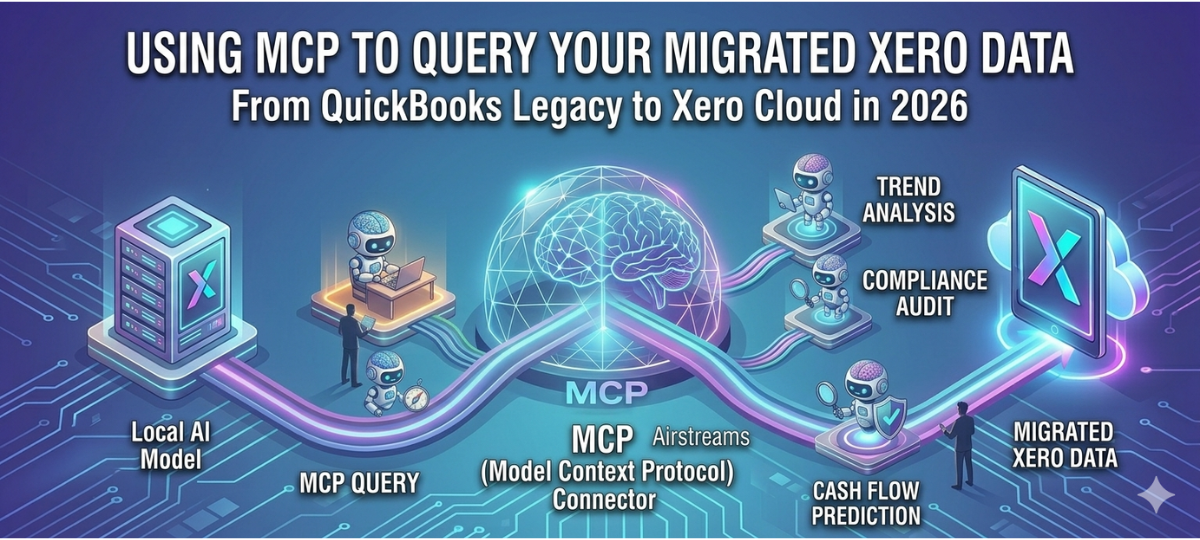

As businesses move toward intelligent financial systems, the combination of AI tools and cloud accounting platforms is transforming how companies analyze and use financial data. After completing a QuickBooks Desktop to Xero migration, organizations can unlock new capabilities by integrating their accounting system with AI frameworks such as Model Context Protocol (MCP).
MCP allows AI systems to securely access structured business data, enabling smarter automation, financial insights, and conversational analytics. When connected with Xero, MCP makes it possible to query accounting data using AI models in real time.
This blog explains how MCP can help businesses interact with their migrated Xero data, automate financial workflows, and extract insights from accounting systems after QuickBooks to Xero data migration.
What is Model Context Protocol (MCP)?
Model Context Protocol (MCP) is an emerging framework designed to enable AI systems to securely access structured data from applications such as databases, APIs, and business platforms.
In simple terms, MCP acts as a standardized bridge between AI models and business software systems.
With MCP, AI tools can:
- Query business data in real time
- Access structured datasets from APIs
- Automate complex data analysis tasks
- Integrate with enterprise applications
When connected to accounting platforms like Xero, MCP allows AI models to analyze financial data after QuickBooks conversion or migration.
Why MCP Matters After QuickBooks to Xero Migration
When organizations move from QuickBooks to Xero, they gain access to cloud-based accounting data through APIs and integrations.
MCP enhances this capability by enabling AI models to interact directly with financial systems.
With MCP integration, businesses can:
- Ask AI questions about financial performance
- Generate automated reports
- Monitor transactions in real time
- Identify accounting anomalies
This creates an AI-powered financial intelligence layer on top of Xero accounting data.
How MCP Works with Xero Accounting Data
After completing QuickBooks Desktop to Xero conversion, accounting data becomes accessible via Xero’s API.
MCP can connect AI systems with this data using structured queries.
The workflow typically looks like this:
1. Data Migration from QuickBooks to Xero
Businesses first perform a QuickBooks Desktop to Xero migration, transferring financial records, transactions, and reports to the Xero platform.
2. MCP Integration with Xero API
The MCP framework connects AI models to the Xero API, enabling secure data access.
3. AI Query Execution
AI systems use MCP to query accounting datasets such as:
- invoices
- payments
- expenses
- financial reports
4. Real-Time Insights
AI models generate analytics and insights based on Xero financial data.

Unlock Insights from Your Migrated Xero Data
Want smarter ways to access and analyze your migrated Xero data? Discover how MCP (Model Context Protocol) enables intelligent querying, automation, and deeper financial insights from your accounting data.
Key Benefits of MCP for Xero Users
AI-Powered Financial Insights
Businesses can use AI to analyze financial performance instantly after QuickBooks to Xero migration.
Automated Financial Queries
Users can ask questions like:
- What were our top expenses last quarter?
- Which clients have outstanding invoices?
- What is our monthly cash flow trend?
AI models retrieve answers directly from Xero data.
Improved Decision Making
By combining MCP with accounting platforms, businesses gain faster access to financial insights.
Intelligent Financial Automation
AI agents can automate tasks such as:
- invoice reminders
- expense classification
- financial reporting
Use Cases for MCP with Migrated Xero Data
AI Accounting Assistants
Companies can deploy AI assistants that answer financial questions based on Xero data.
Automated Reporting
Generate financial reports instantly without manual accounting queries.
Predictive Financial Analytics
AI models can forecast revenue, cash flow, and expenses.
Fraud Detection
AI tools can identify anomalies in financial transactions.
Why Cloud Accounting Enables AI Integration
Cloud accounting platforms like Xero enable advanced AI integrations because they provide:
- API access
- structured financial datasets
- real-time financial updates
This makes Xero the ideal platform for businesses migrating from QuickBooks Desktop to Xero.
Future of AI-Powered Accounting Systems
In the coming years, MCP and similar frameworks will enable businesses to create fully autonomous accounting systems.
These systems will:
- automatically monitor financial performance
- generate predictive insights
- automate bookkeeping tasks
- identify financial risks
As more organizations switch from QuickBooks to Xero, the ability to connect AI tools to accounting platforms will become increasingly important.
Final Thoughts
Migrating from QuickBooks Desktop to Xero is only the first step toward modern accounting systems. By integrating Model Context Protocol (MCP) with Xero, businesses can unlock AI-powered analytics, automation, and financial intelligence.
Organizations that combine QuickBooks to Xero migration with AI-driven financial systems will gain a competitive advantage through smarter financial decision-making.
Related Hashtags:
#XeroMigration#QuickBooksToXero#AIAccounting#ModelContextProtocol#AccountingAutomation#CloudAccounting