MetaDesign Solutions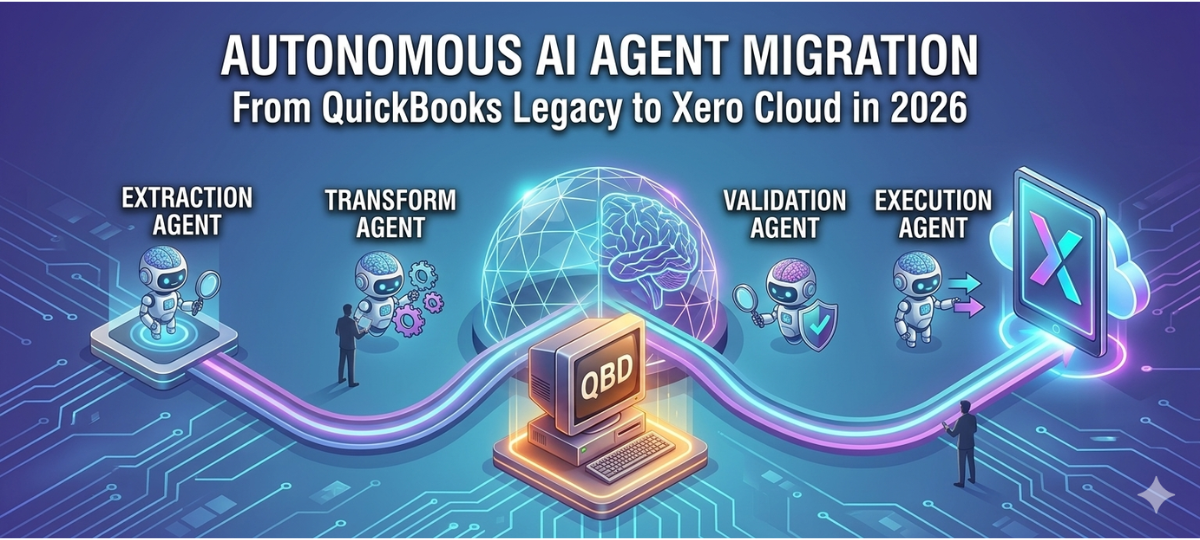

Businesses worldwide are rapidly shifting from legacy accounting systems to modern cloud platforms. One of the most common transitions is QuickBooks to Xero migration, as organizations look for scalable, automated, and cloud-based accounting solutions.
Traditionally, migrating accounting data required manual processes, spreadsheets, and time-consuming validation. However, AI agents are transforming the way QuickBooks Desktop to Xero migration happens, making the process faster, safer, and more accurate.
AI-powered automation now enables organizations to convert QuickBooks files, validate financial records, map data structures, and complete full QuickBooks to Xero data migration with minimal manual intervention.
In this blog, we explore how AI agents are enabling autonomous QuickBooks conversion, the benefits for businesses, and why AI-driven migration is becoming the preferred approach in 2026.
Why Businesses Are Moving from QuickBooks to Xero
Many organizations are choosing to move from QuickBooks to Xero because cloud accounting offers greater flexibility, automation, and collaboration.
Here are some key reasons businesses are switching from QuickBooks to Xero:
1. Cloud-Based Accessibility
Xero provides cloud-based accounting, allowing teams to access financial data anytime and from any location.
2. Real-Time Financial Insights
Unlike traditional systems, Xero delivers real-time financial reporting and dashboards for better decision-making.
3. Automation of Accounting Tasks
From bank reconciliation to invoice processing, Xero automates many accounting workflows.
4. Integration Ecosystem
Xero integrates with over 1,000 business applications including CRM, payroll, and inventory systems.
5. Scalable Financial Infrastructure
As businesses grow, Xero offers scalable accounting capabilities without complex system upgrades.
Because of these benefits, companies frequently transfer QuickBooks to Xero to modernize their financial systems.
What Are AI Agents in Data Migration?
AI agents are intelligent automation systems capable of performing tasks independently by analyzing data, learning patterns, and executing workflows without constant human input.
In the context of QuickBooks to Xero conversion, AI agents can:
- Analyze QuickBooks database structures
- Map financial data to Xero formats
- Identify inconsistencies in accounting records
- Automate financial data conversion
- Validate migrated records
Instead of manual migration processes, AI-driven tools enable autonomous QuickBooks Desktop to Xero migration.
How AI Agents Enable Autonomous QuickBooks to Xero Migration
AI agents play several critical roles during the QuickBooks data migration process. These systems ensure accurate conversion while reducing the risks associated with manual accounting data transfer.
1. Intelligent Data Mapping
One of the biggest challenges during QuickBooks conversion is mapping the financial data structure to Xero.
AI agents automatically map:
- Chart of accounts
- Vendor and customer records
- Transaction histories
- Invoices and payments
- Tax configurations
This intelligent mapping significantly reduces manual data preparation when businesses convert QuickBooks files.
2. Automated Data Cleaning
Financial systems often contain duplicate or inconsistent data.
AI-powered migration tools automatically detect and correct:
- Duplicate transactions
- Invalid account references
- Missing financial entries
- Inconsistent formatting
This ensures clean datasets before performing QuickBooks Desktop conversion to Xero.
3. Smart Transaction Classification
AI algorithms analyze transaction patterns and categorize financial records during migration.
For example, AI agents can:
- Classify expenses automatically
- Detect payment categories
- Map tax rules accurately
- Identify reconciliation mismatches
This makes QuickBooks to Xero data migration more accurate and efficient.
4. Real-Time Migration Validation
AI agents continuously monitor the migration process and compare financial records across both systems.
They automatically validate:
- Account balances
- Invoice totals
- Bank transactions
- Financial reports
This real-time validation ensures that the QuickBooks Desktop to Xero migration solution maintains financial accuracy.
5. Automated Error Detection
Migration errors can disrupt accounting workflows.
AI agents identify migration issues such as:
- Missing records
- Incorrect account mappings
- Unbalanced ledgers
- Incomplete transaction transfers
By resolving issues automatically, AI-powered systems improve the reliability of QuickBooks conversion tools.

Power Your Migration with AI Agents
Curious how AI agents are transforming QuickBooks to Xero data migration? Discover how intelligent automation can handle complex data transfers, improve accuracy, and streamline the entire migration process with minimal manual effort.
Benefits of AI-Driven QuickBooks to Xero Migration
Using AI agents for QuickBooks Desktop to Xero migration services offers several advantages for businesses.
Faster Migration Process
AI automation significantly reduces the time required to transfer QuickBooks to Xero, often completing migrations in hours instead of days.
Higher Data Accuracy
Machine learning algorithms ensure precise data mapping and financial validation.
Reduced Manual Effort
AI agents automate repetitive accounting tasks, minimizing manual intervention.
Lower Migration Costs
Automation reduces operational costs associated with manual accounting data conversion.
Scalable Migration Framework
AI-driven systems can handle large accounting databases during QuickBooks data migration.
The Role of QuickBooks Conversion Tools and AI
Modern QuickBooks conversion tools are increasingly powered by artificial intelligence. These tools analyze accounting databases and automate migration workflows.
Key features of AI-powered QuickBooks conversion solutions include:
- Automated financial data extraction
- Intelligent data transformation
- Secure migration pipelines
- Audit-ready financial validation
- Scalable cloud-based migration frameworks
These capabilities make QuickBooks Desktop to Xero conversion faster and more reliable.
Common Challenges in QuickBooks to Xero Migration
Despite automation, businesses may still encounter challenges when switching from QuickBooks to Xero.
Data Structure Differences
QuickBooks and Xero use different accounting structures that require careful mapping.
Historical Data Complexity
Large transaction histories may require optimized migration strategies.
Custom Accounting Workflows
Businesses often have custom workflows that require configuration in Xero.
Integration Dependencies
Existing integrations must be reconfigured after migration.
AI-powered migration frameworks help solve these issues during QuickBooks Desktop migration to Xero.
Future of AI in Accounting Data Migration
By 2026, AI is expected to play an even bigger role in accounting system migrations.
Future innovations may include:
- Fully autonomous accounting migrations
- AI-driven financial audits during migration
- Predictive financial data validation
- Self-learning accounting migration systems
These technologies will further streamline QuickBooks to Xero migration solutions.
When Should Businesses Migrate from QuickBooks to Xero?
Businesses should consider migrating when:
- QuickBooks desktop systems become difficult to maintain
- Remote accounting collaboration is required
- Financial reporting needs improvement
- Automation and integrations become essential
A well-planned QuickBooks Desktop to Xero migration strategy ensures a smooth transition to cloud accounting.
Final Thoughts
The adoption of AI agents in QuickBooks to Xero migration is transforming how businesses move their financial data between accounting systems.
With intelligent automation, companies can now convert QuickBooks files, migrate financial records, and complete full QuickBooks Desktop to Xero conversion with greater accuracy and speed.
As AI continues to evolve, autonomous migration systems will make accounting platform transitions easier, faster, and more reliable for businesses worldwide.
Organizations planning to move from QuickBooks to Xero should consider AI-powered migration solutions to ensure a secure and efficient financial data transition.
Related Hashtags:
#QuickBooksToXero#QuickBooksMigration#XeroMigration#AccountingAutomation#QuickBooksConversion#CloudAccounting#AIInAccounting#AccountingTechnology#XeroAccounting#QuickBooksDataMigration#FintechAutomation#AIDataMigration#DigitalAccounting#AccountingInnovation#BusinessAutomation